On this page
The Readiness card shows the state an athlete starts the day in: it compares last night with the athlete's own normal range and suggests whether to train as planned.
OverviewHealthThe same card sits on the athlete dashboard, with a See details link to the health page. It only appears there once watch data exists.
Read the tiles
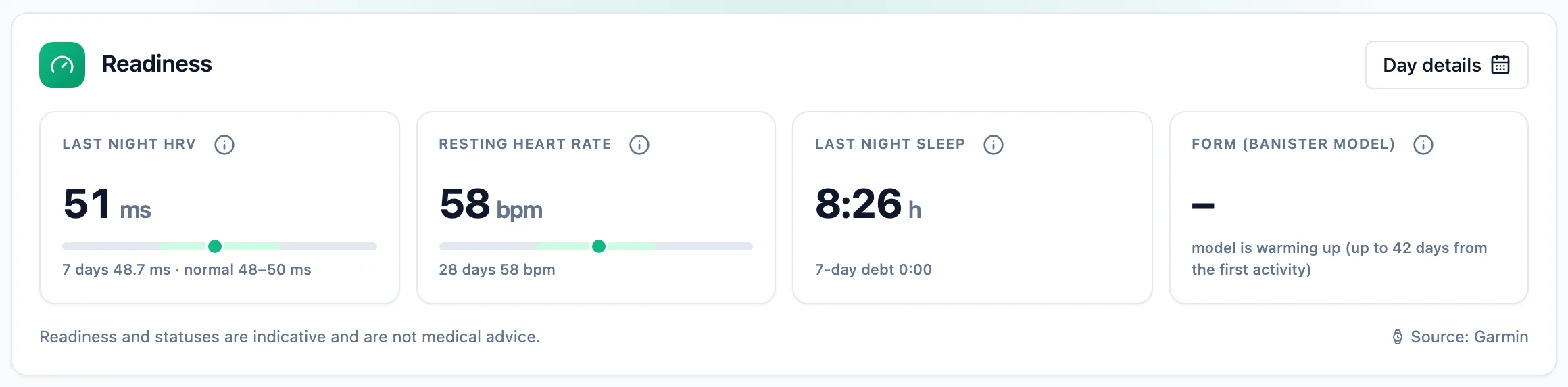
Last night HRV and Resting heart rate show a bar with the athlete's normal range and a marker for today's value. HRV is judged on the average of the last week, not a single night, and rated Balanced, Below baseline or Above baseline. Last night sleep shows sleep time, the sleep debt over the week and regularity.
Check the form
The Form (Banister model) tile is the training load balance: below zero fatigue dominates, above zero freshness. It comes from activities, not from the watch, and needs a few weeks of history.
Read the decision of the day
An athlete without a trainer sees one of three decisions next to Today: Train as planned, Reduce intensity or Recover or consult, with a 0-100 score beside it. The score is a helper number averaged from HRV, heart rate, sleep, the survey and load; the decision follows a rule, not a score threshold.
Athletes with a trainer
An athlete who has a trainer sees no decision and no score - only the tiles. The training decision belongs to the trainer. On the athlete's health page the trainer sees a A hint for you box with the decision and its reasons, such as HRV below baseline or Sleep too short, each with the numbers behind it.

More in this section: Health
For coaches and athletes
Watch metricsWhat the Health page shows: sleep, HRV, resting heart rate and other watch data, recovery set against training load, and the day details.For athletes
Sharing data with your trainerHow to turn on health data import from your watch, share it with your trainer, stop sharing and delete the stored data.For athletes
Your body measurementsHow to log weight, body composition and circumferences, where the values come from and how to correct or remove a measurement.For coaches
Your athlete's body measurementsHow a coach checks an athlete's weight, body composition and circumferences, logs a measurement on their behalf and what the athlete then sees.